

1
Open the sensor
On the Sensors tab, open the device. Under Field, the map shows where the app thinks it is. A probe that has never been placed sits at the field’s centre.
2
Edit location
Edit location opens the picker on the field. Drag the pin to where the probe is in the ground, or Use my location while standing beside it; the accuracy in metres is shown.
3
Confirm the point
The dashed ring around the pin is 30 m across, which is the ground the reading speaks for. Tap Confirm the point.
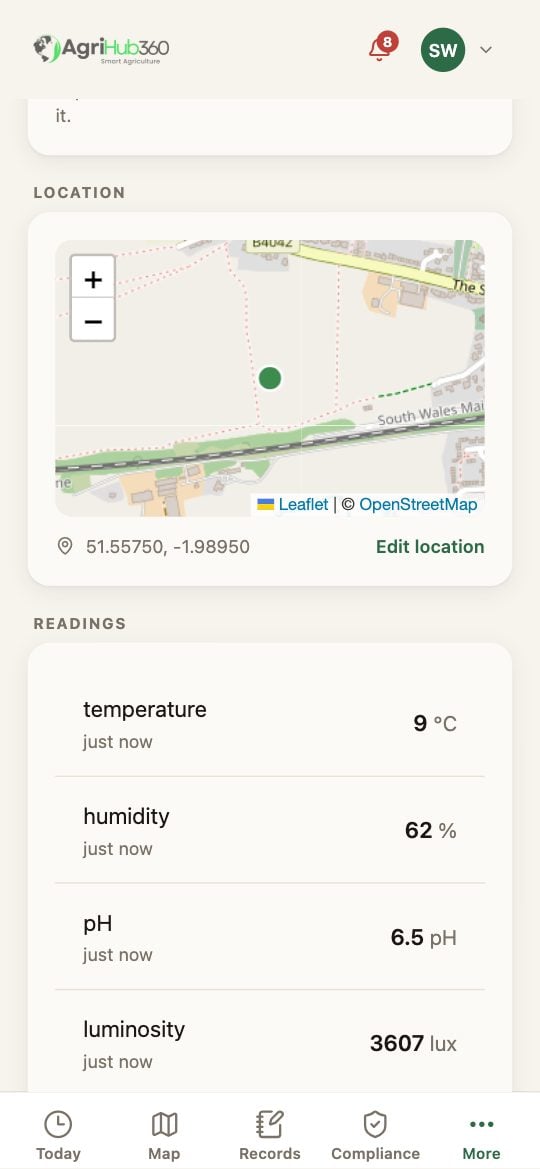
The sensor's page: the field, and the map with the pin and Edit location.
What You See Next
The reading is drawn at the pin on the Map and in the record. The siting checks measure a sensor near water from the point; the zones know which zone the probe is in. A second probe goes where the first ring does not reach.If It Does Not
Related: Claim the Sensor, Live Soil Readings.