

1
Sensors, then Add a sensor
Identify your sensor: point the camera at the QR code on the sticker, which is on the underside near the battery door. Or choose Type the serial instead and enter it in the form AH-XXXX-XXXX.
2
Choose the field
Pick the field it stands in. It is drawn at the field’s centre until you place it.
3
Place it on the map
The claim ends with Place it on the map: drag the pin to where the probe is, and the 30 m ring shows what it covers. You can also do this later from the sensor’s page.
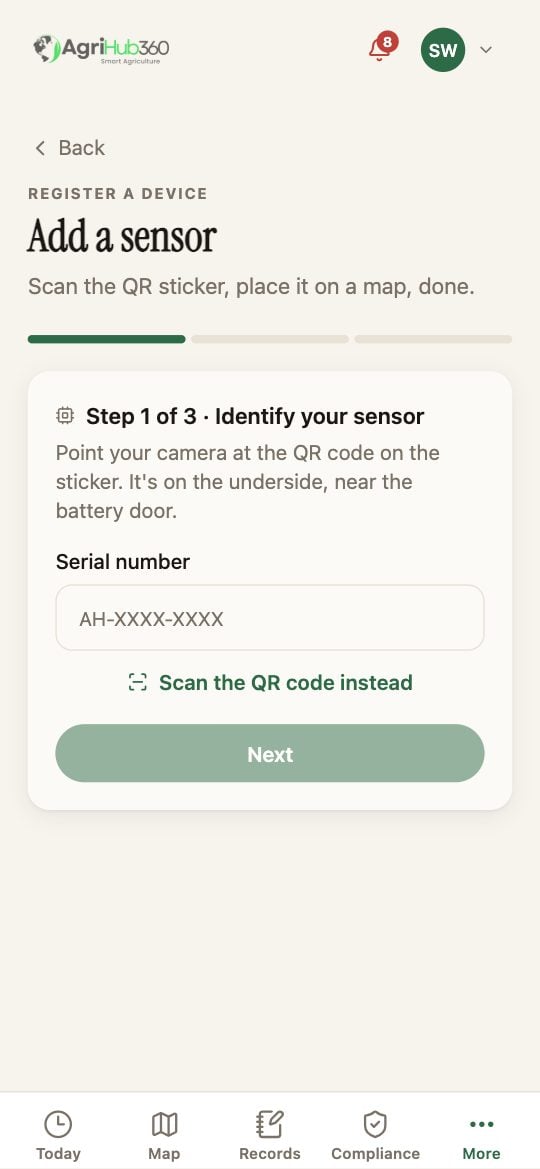
Add a sensor: step one, the serial.
What You See Next
The sensor is on the Sensors tab with its battery, its signal and its last reading, and on the field as a measured number beside the modelled one.If It Does Not
Related: Place a Probe on the Field, A Sensor Has Gone Quiet, The AgriHub360 Sensor.