

1
Sensors, then Connect a station
More → Sensors → Connect a station. The page says which gateways work: any Ecowitt gateway or console with a Customized upload, and the Froggit and Ambient Weather stations built on the same one.
2
Name it and pick its field
The name is what the Sensors tab shows. The field is where the channel 1 soil probe sits; leave it empty for a station with no soil probe.
3
Copy the four lines into the gateway
The app shows the protocol, server, path and port. In the WS View Plus app: the gateway → Weather Services → Customized → Enable, protocol Ecowitt, then those four. An upload interval of one to five minutes is fine. The path is the station’s credential; the app shows it once.
4
Wait one interval
The first upload arrives within the interval you set. Until then the station shows as silent on the Sensors tab with what to check.
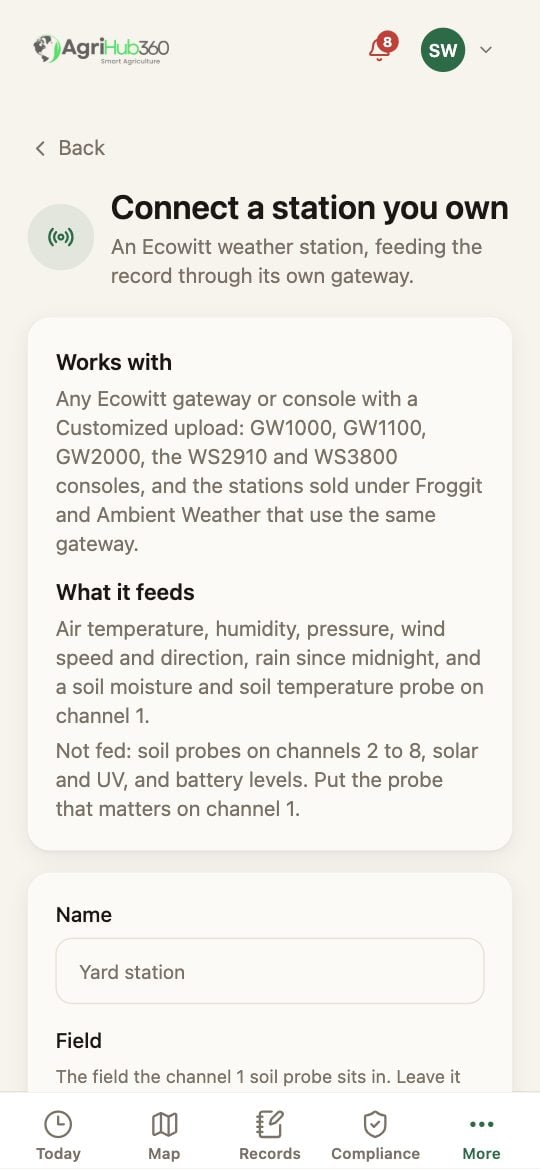
Connect a station, under Sensors.
What You See Next
The station is a row on the Sensors tab with its last reading, how long ago it came and the day’s line. Its readings are labelled measured on the field and in the record, with the station as their source. The full list of what is fed, and what is not, is on Ecowitt Station.If It Does Not
Related: A Sensor Has Gone Quiet, Is a Probe Worth It Here, Ecowitt Station.