

1
Press + and choose Spray
The + button sits on every tab. The sheet opens on Spray with the field, the date and the weather already filled in. Change the field with its chip.
2
Type the product
Start typing the name. The matches come from the MAPP register with their approval for the field’s crop. Pick one: the MAPP number and the check come with it. A withdrawn product cannot be picked.
3
Rate and target
Enter the rate in litres or kilograms per hectare, and the target if you know it. The four assurance fields under them are optional: water volume, growth stage, LERAP category and buffer, harvest interval. A blank prints as “not recorded” on the record.
4
A photo, then Save
Add a photo opens the camera; a picture of the label is enough. Save record writes the entry. With no signal it is kept on the phone and sent when you are back in range.
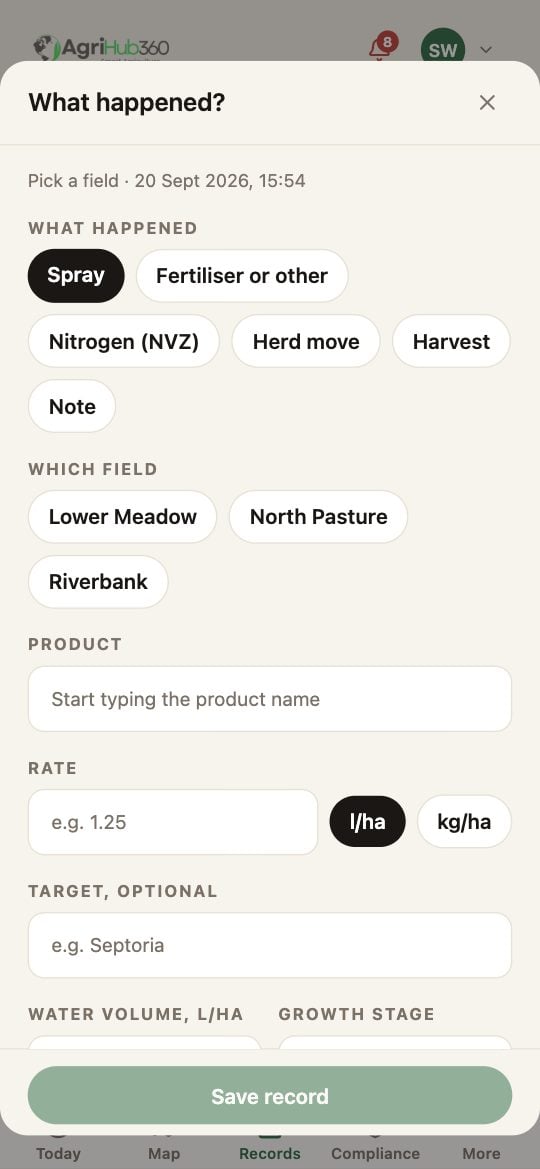
The + sheet on Spray, on the Records tab.
What You See Next
The spray is a row on the Records tab under today’s date, with its MAPP number, and a line on the plant protection product record in the pack. A product the register flags is saved with the warning on it; a blocked product is not saved, and the sheet says why.If It Does Not
Related: The Records Timeline, Offline Action Queue.