

1
More, Support, then Chat with AgriBot
Type what happened as you would say it: “Log the spray I just did: Aviator Xpro at 1 l/ha on North Pasture for septoria”.
2
Read the draft
The reply includes a card titled A spray record, drafted, with the product, the field, the rate, the target, the MAPP number and the approval check. Nothing has been saved at this point.
3
Open in the sheet, then Save
Open in the sheet puts the draft on the + sheet with every box filled in. Check it, add a photo, Save record. Discard throws the draft away.
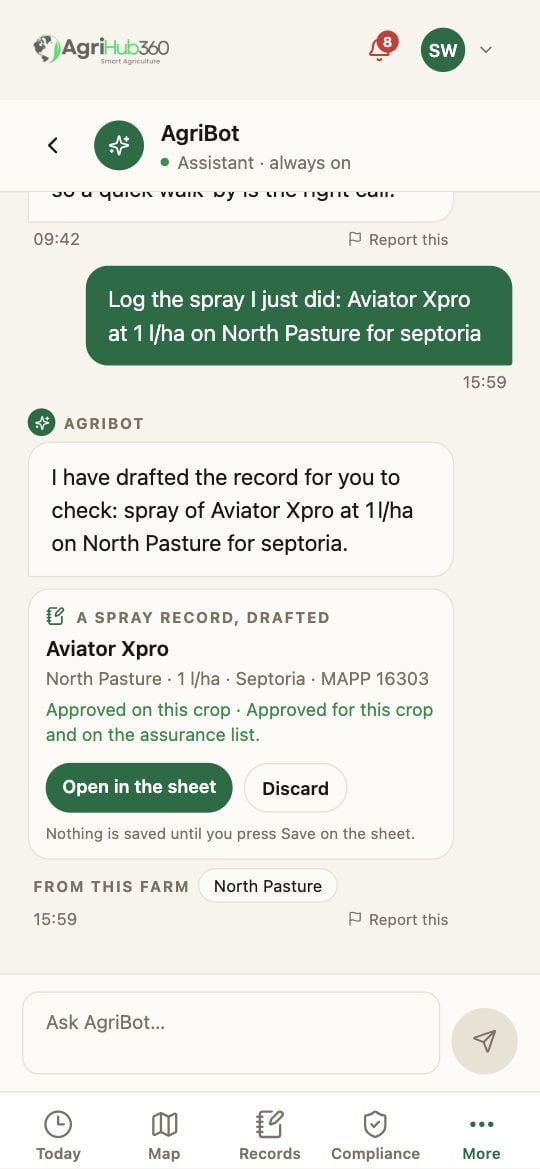
The assistant's reply with a drafted spray record and Open in the sheet.
What You See Next
The record is saved only when you press Save, and it carries your name, the time and the phone’s location. The assistant does not answer questions about what to spray. Those go to a qualified approver and come back with their name on them.If It Does Not
Related: Log a Spray, Document Drafting.