

1
Open Compliance
The tab opens on Inspection-ready, a count such as 8 of 10, and the list. A green tick is held; amber is partly, some fields but not all; red is missing.
2
Tap a line
An amber or red line says what is missing and where: “a soil analysis under five years on 1 field”, “no watercourse, spring or borehole on the map”. Tap it to go there.
3
Fix it and come back
Draw the ditch, add the sample or record the crop, whichever the line asked for. The list updates by itself, and so does the count on Today and the pack cover.
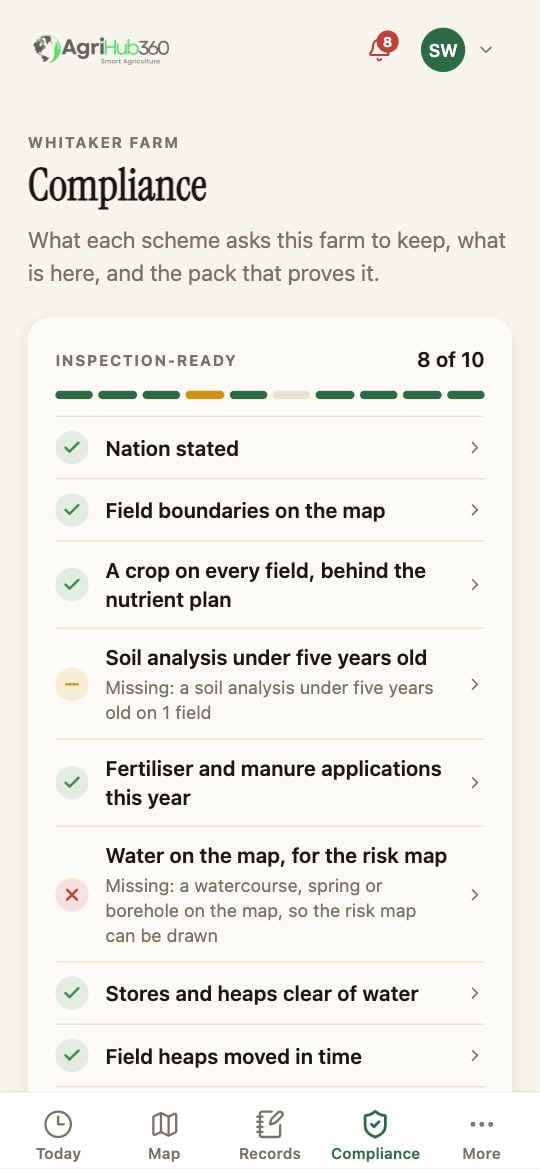
The Compliance tab: Inspection-ready, 8 of 10, with the held, partly and missing lines.
What You See Next
The same list is printed on the pack cover as it stood on the day the pack was built. One line, the spreader and sprayer calibration record, is not held in the app and is printed as a paper item to complete by hand.If It Does Not
Related: Build and Share the Pack, One Compliance Vault.