> ## Documentation Index
> Fetch the complete documentation index at: https://docs.agrihub360.com/llms.txt
> Use this file to discover all available pages before exploring further.
# Claim the Sensor
> Register an AgriHub360 Sensor by scanning its sticker, then choose its field and place it on the map.
**Before you start.** An AgriHub360 Sensor, and a Hub in range and online.
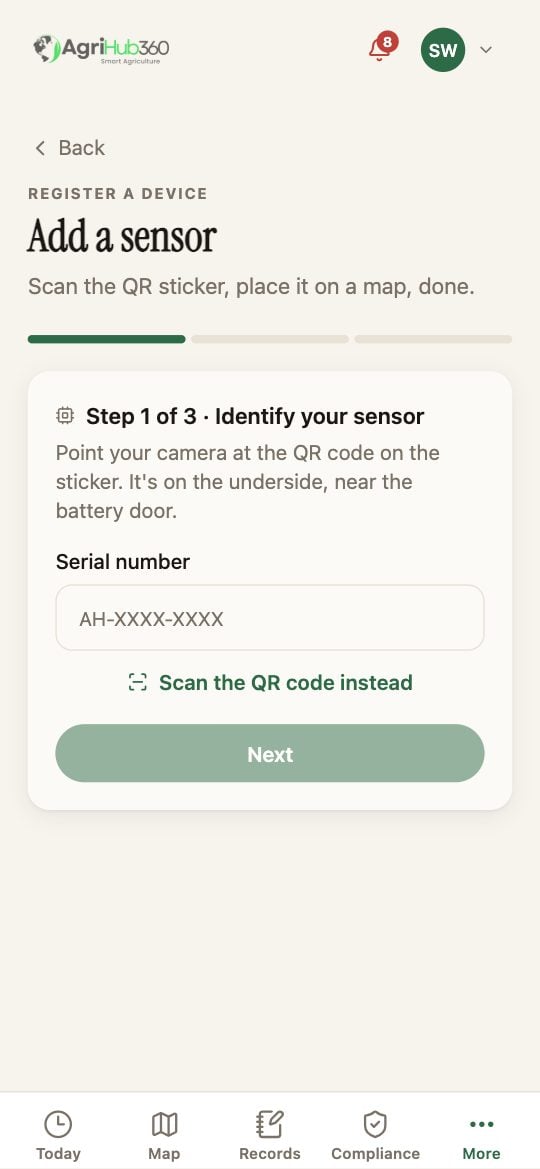
**Identify your sensor**: point the camera at the QR code on the sticker, which is on the underside near the battery door. Or choose **Type the serial instead** and enter it in the form AH-XXXX-XXXX.
Pick the field it stands in. It is drawn at the field's centre until you place it.
The claim ends with **Place it on the map**: drag the pin to where the probe is, and the 30 m ring shows what it covers. You can also do this later from the sensor's page.
 ## What You See Next
The sensor is on the Sensors tab with its battery, its signal and its last reading, and on the field as a measured number beside the modelled one.
## If It Does Not
| You see | It means | Do |
| ------------------------ | -------------------------------------- | -------------------------------------- |
| The serial is refused | It is claimed on another farm | Ask the farm that has it to release it |
| No reading after an hour | The Hub is not online, or out of range | A Sensor Has Gone Quiet |
| The camera does not open | Camera access is off | Type the serial |
Related: [Place a Probe on the Field](/how-do-i/map/place-a-probe-on-the-field), [A Sensor Has Gone Quiet](/how-do-i/sensors/a-sensor-has-gone-quiet), [The AgriHub360 Sensor](/devices/sensor).
## What You See Next
The sensor is on the Sensors tab with its battery, its signal and its last reading, and on the field as a measured number beside the modelled one.
## If It Does Not
| You see | It means | Do |
| ------------------------ | -------------------------------------- | -------------------------------------- |
| The serial is refused | It is claimed on another farm | Ask the farm that has it to release it |
| No reading after an hour | The Hub is not online, or out of range | A Sensor Has Gone Quiet |
| The camera does not open | Camera access is off | Type the serial |
Related: [Place a Probe on the Field](/how-do-i/map/place-a-probe-on-the-field), [A Sensor Has Gone Quiet](/how-do-i/sensors/a-sensor-has-gone-quiet), [The AgriHub360 Sensor](/devices/sensor).