> ## Documentation Index
> Fetch the complete documentation index at: https://docs.agrihub360.com/llms.txt
> Use this file to discover all available pages before exploring further.
# A Sensor Has Gone Quiet
> What the Sensors tab says when a device stops reporting, what it means, and what to do in the order that finds the fault fastest.
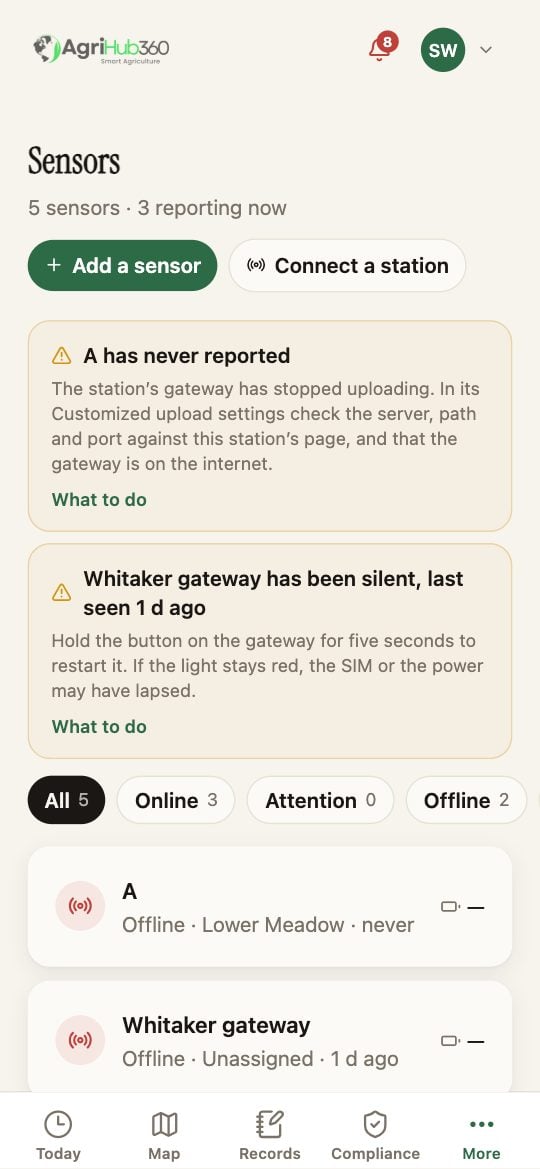
A device that has gone silent gets a card above the list, with the step to take. The gateway's card says how many sensors are behind it.
Hold its button for five seconds to restart it. A light that stays red is the SIM or the power. A gateway that comes back brings its sensors with it.
Check the battery, then the antenna seat, then how far the field is from the gateway. A probe that has come out of the ground reads a constant value; reseat it.
## What You See Next
The card goes when the device reports. The device's page keeps the last reading and the last time it was seen.
## If It Does Not
| The tab says | It means | Do |
| ---------------------------------------------- | -------------------------------------------------------------------------------------- | ------------------------------------------------------------------------------------------------------------------------------------------------ |
| The gateway is silent, and its sensors with it | The link, not the probes. One card: the gateway's, with the count of sensors behind it | Hold the gateway's button for five seconds to restart it. A light that stays red is the SIM or the power |
| The gateway is live, one sensor is silent | That probe | Its battery, then the antenna seat, then how far the field is from the gateway |
| A station has never reported | The upload settings | Server, path and port in the gateway's Customized upload against the station's page in the app; the path is the credential and is case sensitive |
| A sensor reports, but the reading is flat | The probe is out of the ground or shorted | Reseat it; a soil probe in air reads a constant |
 ## After an Hour
A device that is still silent after an hour with the step done is a support case. Open the device's page and send its serial with the note. The device page keeps the last reading and the last time it was seen, which is what support asks first.
Related: [Live Soil Readings](/features/field-monitoring/live-soil-readings), [Ecowitt Station](/devices/ecowitt-station), [The AgriHub360 Hub](/devices/hub).
## After an Hour
A device that is still silent after an hour with the step done is a support case. Open the device's page and send its serial with the note. The device page keeps the last reading and the last time it was seen, which is what support asks first.
Related: [Live Soil Readings](/features/field-monitoring/live-soil-readings), [Ecowitt Station](/devices/ecowitt-station), [The AgriHub360 Hub](/devices/hub).