> ## Documentation Index
> Fetch the complete documentation index at: https://docs.agrihub360.com/llms.txt
> Use this file to discover all available pages before exploring further.
# Log a Spray
> Record a spray in the field, with or without signal, so it appears on the plant protection product record.
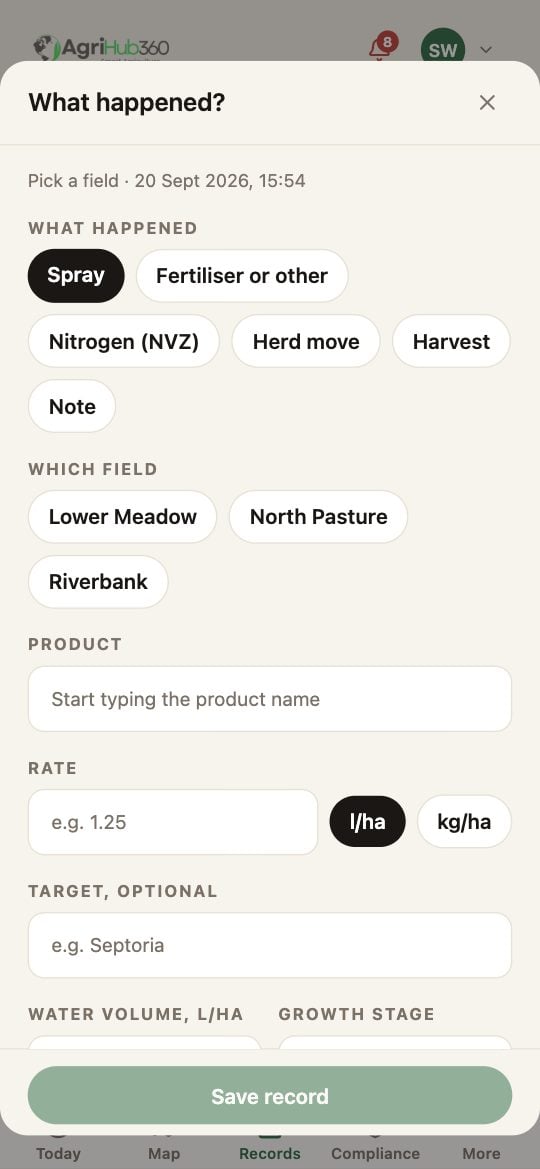
The **+** button sits on every tab. The sheet opens on Spray with the field, the date and the weather already filled in. Change the field with its chip.
Start typing the name. The matches come from the MAPP register with their approval for the field's crop. Pick one: the MAPP number and the check come with it. A withdrawn product cannot be picked.
Enter the rate in litres or kilograms per hectare, and the target if you know it. The four assurance fields under them are optional: water volume, growth stage, LERAP category and buffer, harvest interval. A blank prints as "not recorded" on the record.
**Add a photo** opens the camera; a picture of the label is enough. **Save record** writes the entry. With no signal it is kept on the phone and sent when you are back in range.
 ## What You See Next
The spray is a row on the Records tab under today's date, with its MAPP number, and a line on the [plant protection product record](/features/compliance-and-records/spray-log-with-mapp-check) in the pack. A product the register flags is saved with the warning on it; a blocked product is not saved, and the sheet says why.
## If It Does Not
| You see | It means | Do |
| --------------------------------- | ---------------------------------------------- | --------------------------------------------------- |
| The product is not in the matches | It is not in the MAPP register under that name | Try the MAPP number from the label |
| The sheet will not save | The product is withdrawn | It cannot be recorded as used; the sheet says which |
| Saved, will send | No signal | It goes when the phone is back online |
Related: [The Records Timeline](/features/compliance-and-records/records-timeline), [Offline Action Queue](/features/account-and-data/offline-action-queue).
## What You See Next
The spray is a row on the Records tab under today's date, with its MAPP number, and a line on the [plant protection product record](/features/compliance-and-records/spray-log-with-mapp-check) in the pack. A product the register flags is saved with the warning on it; a blocked product is not saved, and the sheet says why.
## If It Does Not
| You see | It means | Do |
| --------------------------------- | ---------------------------------------------- | --------------------------------------------------- |
| The product is not in the matches | It is not in the MAPP register under that name | Try the MAPP number from the label |
| The sheet will not save | The product is withdrawn | It cannot be recorded as used; the sheet says which |
| Saved, will send | No signal | It goes when the phone is back online |
Related: [The Records Timeline](/features/compliance-and-records/records-timeline), [Offline Action Queue](/features/account-and-data/offline-action-queue).