> ## Documentation Index
> Fetch the complete documentation index at: https://docs.agrihub360.com/llms.txt
> Use this file to discover all available pages before exploring further.
# Leave or Delete a Farm
> Leaving takes you off a farm. Deleting removes it for everyone on it. Packs you have downloaded are yours to keep.
**Before you start.** Build the pack and download it first. What is deleted is gone.
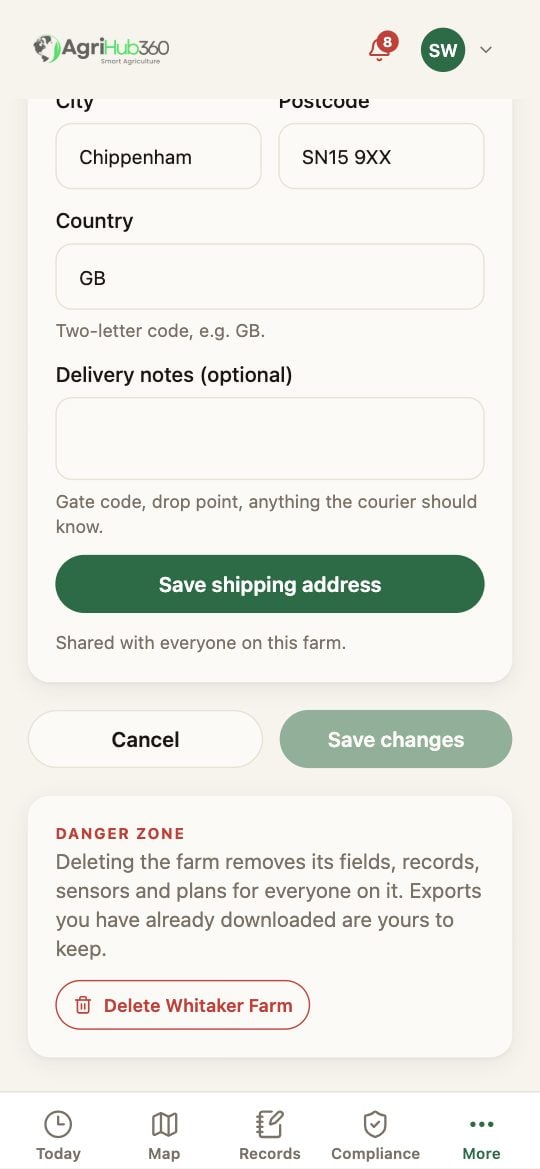
The last card is the **Danger zone**. An owner sees **Delete the farm**; anyone else sees **Leave the farm**.
**Leave** takes you off this farm. Its records stay with the people still on it; an owner can invite you back.
**Delete** asks you to confirm. Every field, record, sensor and plan goes, for everyone on it. The subscription ends with it. This cannot be undone.
 ## What You See Next
Another farm you are on becomes the active one; with none, the app opens on the door to make a new one.
## If It Does Not
| You see | It means | Do |
| ----------------------- | ---------------------- | ------------------------------------- |
| No Delete | You are not the owner | Ask the owner, or leave instead |
| You want the data first | The pack is the export | Build and download it before deleting |
Related: [Build and Share the Pack](/how-do-i/compliance/build-and-share-the-pack).
## What You See Next
Another farm you are on becomes the active one; with none, the app opens on the door to make a new one.
## If It Does Not
| You see | It means | Do |
| ----------------------- | ---------------------- | ------------------------------------- |
| No Delete | You are not the owner | Ask the owner, or leave instead |
| You want the data first | The pack is the export | Build and download it before deleting |
Related: [Build and Share the Pack](/how-do-i/compliance/build-and-share-the-pack).