> ## Documentation Index
> Fetch the complete documentation index at: https://docs.agrihub360.com/llms.txt
> Use this file to discover all available pages before exploring further.
# Invite the Team and Set Roles
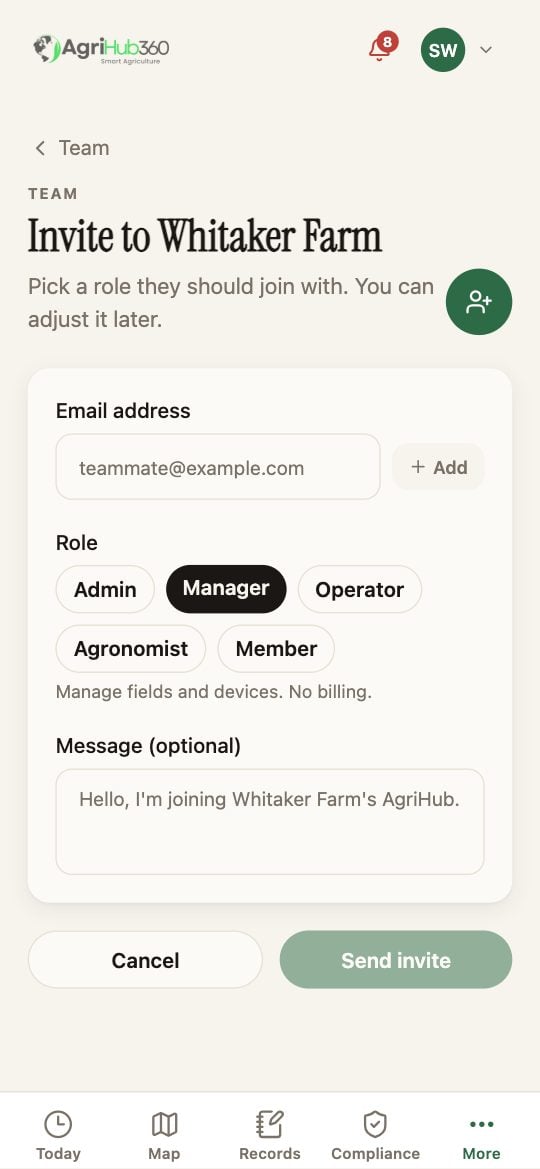
> Invite someone by email with a role. They get a link that works for seven days.
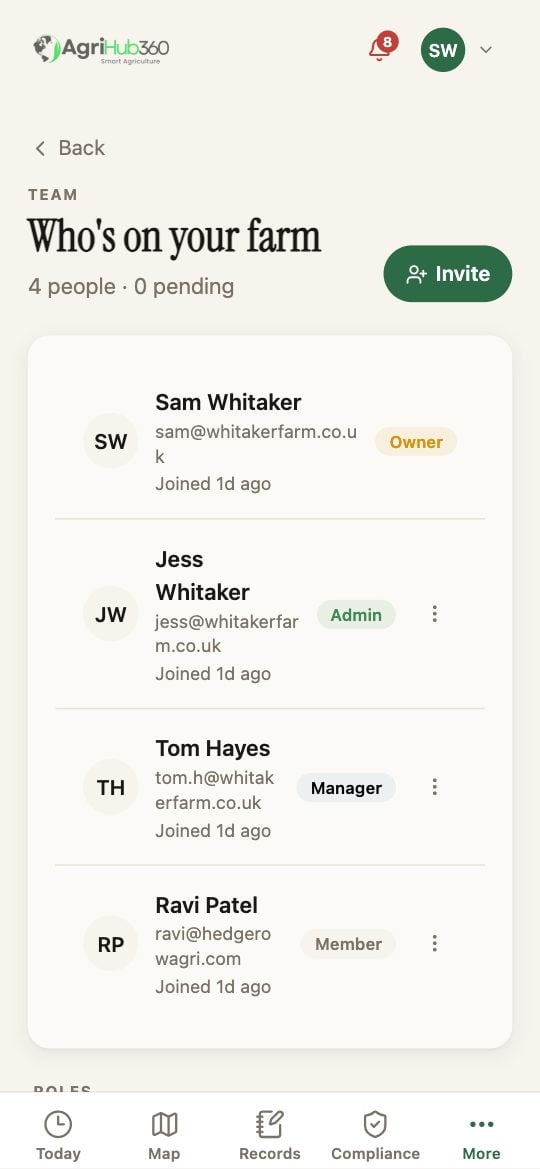
The page **Who's on your farm** lists everyone with their role, and any invites still pending. Tap **Invite**.
Type the email and **Add**; several at once is fine. Pick the role: **Admin** manages team, billing and devices; **Manager** manages fields and devices, no billing; **Operator** logs the work; **Member** sees the farm; **Agronomist** is the external advisor. Narrow the fields they can see if you want to.
A message is optional. Each person gets an email with a link, good for seven days. On the Team page you can change a role or remove a person later.
 ## What You See Next
On Today, **Hand to someone** appears under each decision once there is a second person. Their ticks carry their name into the record.
## If It Does Not
| You see | It means | Do |
| ----------------------- | ------------------------- | -------------------------------- |
| Invite is greyed | The plan's seats are full | More, Billing, or remove someone |
| The link has expired | Seven days passed | Invite again |
| They cannot see a field | Their access was narrowed | Team, their row, the fields |
Related: [Hand a Decision to Someone](/how-do-i/today/hand-a-decision-to-someone), [Invite an Advisor](/how-do-i/more/invite-an-advisor), [Team and Roles](/features/farm-management/team-and-roles).
## What You See Next
On Today, **Hand to someone** appears under each decision once there is a second person. Their ticks carry their name into the record.
## If It Does Not
| You see | It means | Do |
| ----------------------- | ------------------------- | -------------------------------- |
| Invite is greyed | The plan's seats are full | More, Billing, or remove someone |
| The link has expired | Seven days passed | Invite again |
| They cannot see a field | Their access was narrowed | Team, their row, the fields |
Related: [Hand a Decision to Someone](/how-do-i/today/hand-a-decision-to-someone), [Invite an Advisor](/how-do-i/more/invite-an-advisor), [Team and Roles](/features/farm-management/team-and-roles).