> ## Documentation Index
> Fetch the complete documentation index at: https://docs.agrihub360.com/llms.txt
> Use this file to discover all available pages before exploring further.
# Set the Rates and Export for the Tractor
> Set a nitrogen rate for each zone and export the file the terminal reads. Only a field with stable zones can export.
**Before you start.** The field has two or more zones and a **Stable** verdict. [Draw Zones and Run the Stability Test](/how-do-i/map/draw-zones-and-run-the-stability-test) comes first.
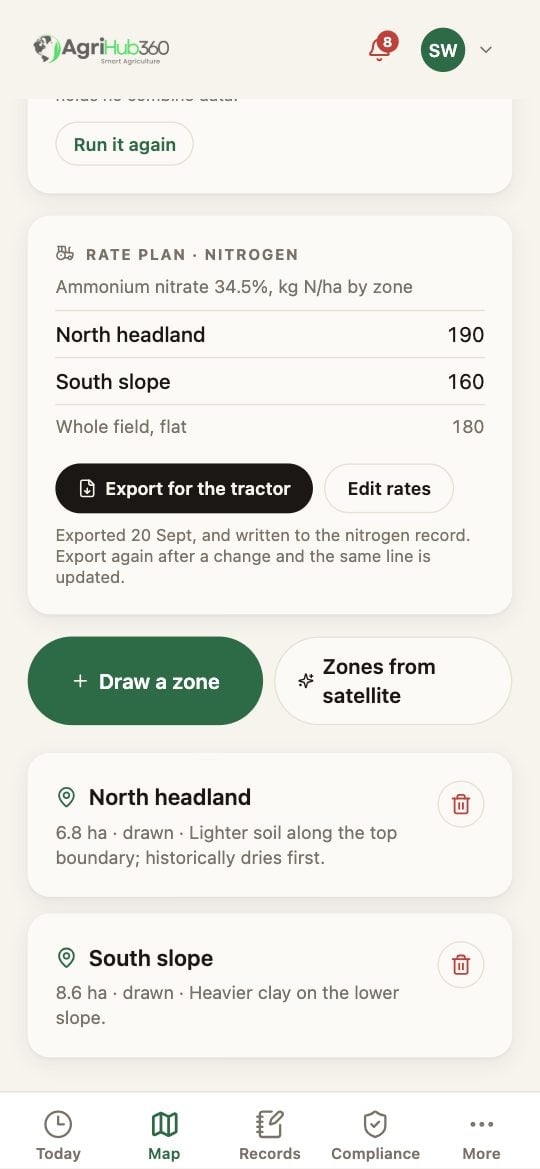
On the zones page, under the verdict, is the **Rate plan, nitrogen** card. Tap **Set the rates** and enter the product, its nitrogen content in percent, a flat rate for comparison, and a kg N/ha figure for each zone. Then **Save**.
On a field with stable zones the button **Export for the tractor** is on the card. On any other field the card says why it is not.
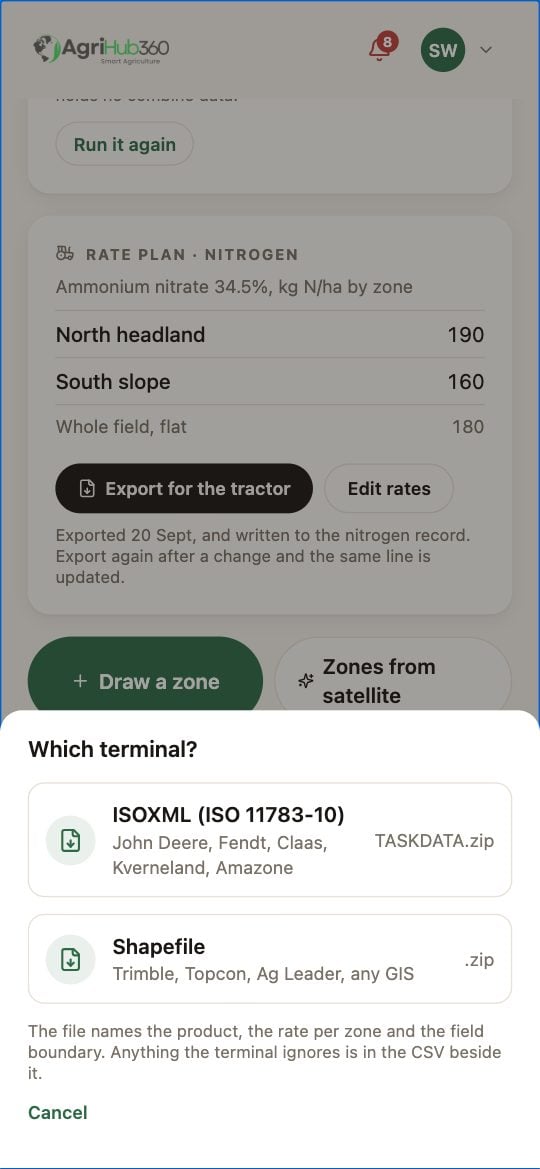
Choose **ISOXML** for John Deere, Fendt, Claas, Kverneland and Amazone terminals; it downloads as a TASKDATA zip. Choose **Shapefile** for Trimble, Topcon, Ag Leader and any GIS. A CSV with the rates is included with both.
 ## What You See Next
The file downloads, and the plan is written to the nitrogen record as one line with the rate by zone, so the N-max check sees it. Export again after a change and the same line is updated, not added to.
## If It Does Not
| You see | It means | Do |
| --------------------------------- | ---------------------------- | ----------------------------------------------------------------------- |
| No Export for the tractor | The verdict is not Stable | Run the test; a Not stable field cannot export |
| The terminal wants a product rate | The N content is blank | Edit rates and fill in the percent; the file then carries kg of product |
| Exports are locked | The farm is on the free plan | More, Billing |
Related: [Draw Zones and Run the Stability Test](/how-do-i/map/draw-zones-and-run-the-stability-test), [Zone Rate Planning](/features/nutrient-planning/zone-rate-planning), [NVZ Nitrogen Records](/features/compliance-and-records/nvz-nitrogen-records).
## What You See Next
The file downloads, and the plan is written to the nitrogen record as one line with the rate by zone, so the N-max check sees it. Export again after a change and the same line is updated, not added to.
## If It Does Not
| You see | It means | Do |
| --------------------------------- | ---------------------------- | ----------------------------------------------------------------------- |
| No Export for the tractor | The verdict is not Stable | Run the test; a Not stable field cannot export |
| The terminal wants a product rate | The N content is blank | Edit rates and fill in the percent; the file then carries kg of product |
| Exports are locked | The farm is on the free plan | More, Billing |
Related: [Draw Zones and Run the Stability Test](/how-do-i/map/draw-zones-and-run-the-stability-test), [Zone Rate Planning](/features/nutrient-planning/zone-rate-planning), [NVZ Nitrogen Records](/features/compliance-and-records/nvz-nitrogen-records).